
주요 콘텐츠로 건너뛰기
수리 커뮤니티 가입 - 계정 만들기

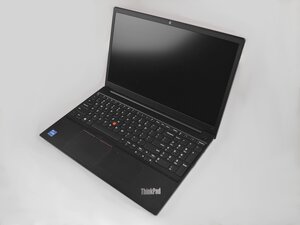
Lenovo ThinkPad E15 Gen 2는 2020년에 출시되었습니다. 11세대 Intel Core i3/i5/i7 프로세서 또는 AMD Ryzen 4000 시리즈 CPU가 탑재될 수 있습니다.

Beep sound with black screen

Hi,

I am facing issue with my laptop lenovo thinkpad e15, it makes a beep sound and black screen before start up and the power button is flashing.

I attached a video link containing the beep sound.

Thanks in advance for supporting. Video for beep sound

답변되었습니다! 답변 보기 저도 같은 문제가 있습니다

좋은 질문입니까?

점수 3
댓글 1개

I have the same issue.

One Reddit user suggested to apply fairly strong pressure on the keyboard in the "T" key region during boot after which it works just fine. It worked for me after a couple tries.

I believe the CPU package started losing contact (the solder joints probably cracked) due to many thermal stress cycles.

댓글 달기

답변 1개

선택된 해법

What your laptop is trying to tell you is that there is a problem. On older machines, a standard Beep Code would have occurred. Which is just pattern of long and short beeps that would correlate to a specific error.

Starting back in 2017(?) Lenovo introduced "SmartBeep" which is what's going on here. It makes a melodic beep rather than the older long and short beeps.

To read the code, you can use a smartphone (or tablet) to interpret. I tried getting the error code using the app on my phone through my MacBook speakers, but my iPad didn't register any codes, and my Android phone didn't hear a valid code (it kept getting 01000), so I am guessing it will need to hear it first hand. You'll need to download the Lenovo diagnostics app to run this (Available on both iOS and Android). Once you know what the error code means, we can help address it. The apop will probably also recommend some things.

이 답변이 도움이 되었나요?

점수 2

댓글 5개:

Hi Alisha,

The lenovo diagnostics app didn't recognize the code, I tried from multiple devices and also didn't catch it.

@muhammad17

Just a suggestion, but try removing the ram from the laptop and check if the error code changes from what you're hearing now.

Ram is checked very early on in POST

Here's the hardware maintenance manual for the laptop.

Go to p.64 to see how to disable the battery first and then p.67 for how to remove the ram module.

Always ensure that the battery is disabled as long as you're working in the laptop removing/reinserting components.

Follow the golden rule - Power OFF first, ON last.

That way you won't cause any electrical damage by working on equipment that may still have power connected to it.

Is the issue solved? If yes, how?

I am having exactly the same problem

I had the same problem... Horrendous beeps.

Tried with and without the battery plugged in but the issue persisted. The Lenovo app doesn't work as intended so no hope there...

I noticed that if I put a little pressure on the CPU when turning the laptop on, it would boot up perfectly and stay turned on. Removing my finger after POST and boot did not effect the laptop at all, it stayed turned on.

I came to the conclusion that some of the solder joins under the CPU may have poor connections.

I used a Hot Air Station and Flux to hopefully reflow the solder joints under the CPU. This is not something I reccomned anyone do unless they have previous experience in doing so.

Laptop is now working perfectly! I hope this answer helps someone as I searched high and low for answers. It may not be the fix for your issue (or be permanent... I dont not have the skill or tools for reballing), but if you get the same results as me by putting slight pressure on the CPU to succefully boot, I reccomend reflowing the CPU.

perfect answer I found my fault same. thankyou

댓글 달기

답변을 추가하세요

Muhammad_17 영원히 감사할 것입니다.
조회 통계:

지난 24시간: 8

지난 7일: 67

지난 30일: 286

전체 시간: 5,064