

How to troubleshooting dead PC
My laptop was dead. What can I do to fix it?
좋은 질문입니까?
점수
2
평판: 552.9k
 11
11
 426
426
 1.6k
1.6k
Hi @jasonkaua
Does the laptop's AC power and battery light turn on when the charger is connected to the laptop?
If the light isn't on, it could be a faulty AC power adapter (charger), a faulty DC-In jack (examples only), a faulty battery or a problem on the motherboard.
Do you have a DMM (digital multimeter) and know how to use it? You will need one to be able to test where the problem may be.
If have you one, first check that there's 19.5V DC when measuring on the DC output plug of the charger.
If there is that proves that the charger is OK. If there isn't then the charger may be faulty and you would need to replace it and then check if the replacement charges the battery in the laptop etc. See the parts list on p.20 (30 of 108 pdf) of the manual linked below to find the part numbers for the charger that are relevant to the charger and your location. Search online for the applicable part number only to find suppliers that suit you best.
If the charger is OK then you need to open the laptop and disconnect the DC-In jack cable plug from the laptop's motherboard and then connect the charger to the laptop's DC-In jack as per normal and check if there's 19.5V DC when measuring between the red and black wires on the jack cable plug.
Here's some information that may help to do this. Here's the Maintenance And Service Guide for the laptop. Go to p.67 (77 of 108 pdf) of the manual to view the procedure to remove the power connector cable (aka DC-In jack) from the laptop. You may not have to do the complete procedure as you might be able to open the laptop and access the cable plug connection on the motherboard and remove the cable from the socket. Here's an image showing where it is located on the board.
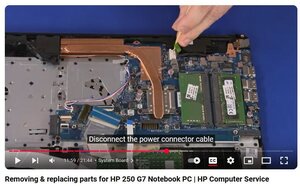
(click on image)
If the DC-In jack is faulty i.e. no voltage seen when measured on the jack's cable plug, it will have to be replaced as it cannot be repaired. Search online for L20475-001 (examples only) to find suppliers that suit you best.
If the light is on then here's the schematic for the motherboard as it will be needed to find out what's wrong
이 답변이 도움이 되었나요?
지난 24시간: 0
지난 7일: 9
지난 30일: 37
전체 시간: 508

