

 4
4 iPhone 8 in Boot Loop
Hi.
As a quick foreword, please forgive my somewhat broken English. You have a %#*@ froggy in the house.
I already posted my question on the French version of the site but never had any reply so far.
My iPhone 8 is stuck in a Boot Loop when I stop using it or when I try to shut it off. The phone is working fine (I can receive and send calls or sms and use the few apps installed). Here for the symptom.
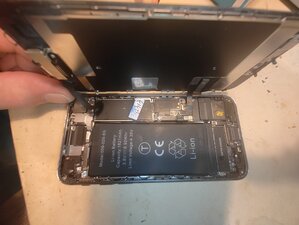
I have to add that I successfully replaced the screen few days ago. I also had to replace the rear case. Unable to remove the original battery from the broken rear case (goddam adhesive strips that always break when you try to tear them off!). I ordered a new one (see picture 1 for reference) and put it in the new rear case.
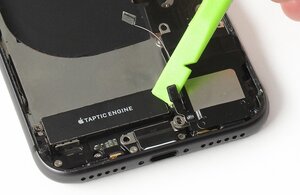
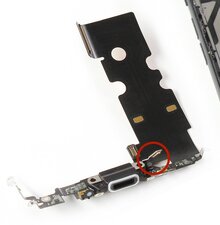
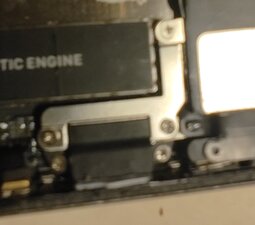
While I was putting back the components, don’t ask me what kind of a demon drove me to get my nose in the lightning port bracket. Anyhow, once it was unscrewed I discovered that the Wi-Fi Diversity Antenna (see picture 2) was connected to nothing. Then I decided to take the missing little connector (see picture 3) to put it in the new rear case. Have I done something wrong? Anyway I came up with the above described issue.
Another useful information. I had access to the “Panic Full” bug reports from my phone, so here we go:
{"bug_type":"210","timestamp":"2025-11-26 19:07:45.00 +0100","os_version":"iPhone OS 16.7.12 (20H364)","roots_installed":0,"incident_id":"D4723989-757F-4BAB-8100-4B626F022541"}
{
"build" : "iPhone OS 16.7.12 (20H364)",
"product" : "iPhone10,1",
"socId" : "8015",
"socRevision" : "11",
"incident" : "D4723989-757F-4BAB-8100-4B626F022541",
"crashReporterKey" : "da6725d19f3ba5fa49be76cb94b0c9eb9c59eff8",
"kernel" : "Darwin Kernel Version 22.6.0: Tue Jul 2 20:47:35 PDT 2024; root:xnu-8796.142.1.703.8~1\/RELEASE_ARM64_T8015",
"date" : "2025-11-26 19:07:45.25 +0100",
"panicString" : "panic(cpu 0 caller 0xfffffff01eed0140): \"i2c3::_checkBusStatus Bus is still in a bad state; last write status 00010110 int shadow 00010100 xfer 00000000 fifo 00000000 for device lm3539\" @AppleS5L8940XI2C.cpp:451\nDebugger message: panic\nMemory ID: 0xff\nOS release type: User\nOS version: 20H364\nKernel version: Darwin Kernel Version 22.6.0: Tue Jul 2 20:47:35 PDT 2024; root:xnu-8796.142.1.703.8~1\/RELEASE_ARM64_T8015\nKernelCache UUID: C77F966291D7FB718E05F899C6EEC2BA\nKernel UUID: 28E24CE2-BA1C-38B1-AC56-C0BE08A077BC\nBoot session UUID: D4723989-757F-4BAB-8100-4B626F022541\niBoot version: iBoot-8422.142.2.700.1\nsecure boot?: YES\nroots installed: 0\nPaniclog version: 14\nKernel slide:
After a long research on Google I could figure out that the i2c3 error code may either involve the lightning cable or the display connector. Can someone come up with a clue or any answer. Thank you in advance.
좋은 질문입니까?

 89
89  157
157 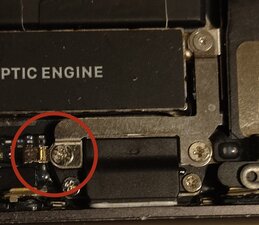

댓글 2개
A boot loop on the iPhone 8 after a housing and battery swap is usually caused by an I2C line fault. Your panic log points to i2c3 and the LM3539, which is part of the backlight/power circuitry. That means one of the flexes connected to the logic board is either damaged, pinched, or not seated cleanly.
Most common causes after a rebuild:
– Slight tear in the display flex
– Damage to the backlight circuit near the connector
– Something shorted around the Lightning port bracket when you moved parts over
– A missing or incorrect screw (“long screw damage”) near the display connector area
I’d first recheck the screen connectors under magnification and inspect the bracket area you mentioned. If the loop continues, it’s usually a board-level fault. I’ve seen the exact error in repairs at my workshop (iRepairGuys Preston), and it ended up being a tiny I2C line knock near the display connector.
Sebastian Faulks 의
Hi Sebastian. Thank you for your reply. I don’t know if you checked Jerry Wheeler’s reply. Anyway I followed his advice and replaced the Taptic Engine. I don’t know if the Taptic Engine from the brand new rear case was broken or if one the Wi-Fi Diversity Antenna connectors was not correctly seated during my repair. Anyhow this solved the problem.
Thank you very for taking the time to reply.
François CROCY 의