주요 콘텐츠로 건너뛰기
수리 커뮤니티 가입 - 계정 만들기

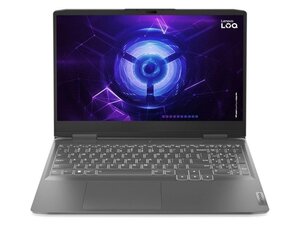
Intel Core i5-12450HX, 최대 RTX 4060 GPU, 15.6형 FHD 144 Hz 디스플레이, 최대 32GB DDR5, PCIe Gen4 SSD, 60Wh 배터리, HDMI 2.1 및 USB-C를 포함한 전체 입출력(I/O) 단자를 탑재한 Lenovo LOQ 15IAX9.

Usb ports not working

Good day I trust you are well. I have the above mentioned laptop. I use a cooling pad as well as accessories for gaming, my two rear usb ports suddenly stopped working. I have gone through the drivers as well as softwares and checked that everything is correct, usbs are still dead. Any advice? Kind regards

이 질문에 답하기 저도 같은 문제가 있습니다

좋은 질문입니까?

점수 1
댓글 1개

Dell USB port not working

댓글 달기

답변 1개

가장 유용한 답변

Hi @wouterbred35891

Connect a mobile phone or USB mouse to one of the USB ports and check if the phone starts to charge or the mouse's laser light turns on.

If they don't go to Device Manager and check that the USB Power Management setting of "Allow the computer to turn off this device to save power" is unchecked.

To get to Device Manager in Win10/11 press the Win key + x key (both together) and select the Device Manager link in the options menu box that opens.

When in Device Manager scroll down to Universal Serial Bus Controllers → click on > symbol to expand the entry list right click on a USB Root Hub entry → Properties → Power Management

If the checkbox is checked uncheck it → OK

Do this for all the USB Root Hub entries shown in the list.

When completed, close all open windows and then restart Windows in the normal manner and check if the USB ports now work OK

이 답변이 도움이 되었나요?

점수 1
댓글 달기

답변을 추가하세요

Wouter Bredenkamp 영원히 감사할 것입니다.
조회 통계:

지난 24시간: 2

지난 7일: 21

지난 30일: 71

전체 시간: 553
