주요 콘텐츠로 건너뛰기
수리 커뮤니티 가입 - 계정 만들기

Skullcandy Crusher Wireless Battery Replacement

필요한 것

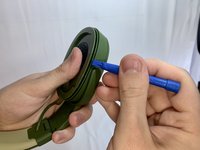
  1. Skullcandy Crusher Wireless Battery Replacement, Ear Cushion: 1 단계, 이미지 2개 중 1개 Skullcandy Crusher Wireless Battery Replacement, Ear Cushion: 1 단계, 이미지 2개 중 2개
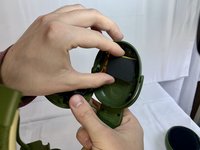
    • Take your headphones and hold them upside down for better control with your hands.

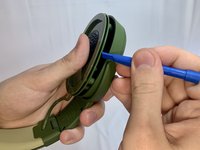
  2. Skullcandy Crusher Wireless Battery Replacement: 2 단계, 이미지 2개 중 1개 Skullcandy Crusher Wireless Battery Replacement: 2 단계, 이미지 2개 중 2개
    • Grab the ear cushion firmly between your thumb and forefinger with a tight grip.

    • Pull the ear cushion away from the plastic, covering the speaker, by sliding the ear cushion down to release it.

  3. Skullcandy Crusher Wireless Battery Replacement: 3 단계, 이미지 1개 중 1개
    • Continue pulling it away from the edges of the plastic covering until the cushion is fully removed.

  4. Skullcandy Crusher Wireless Battery Replacement, Battery: 4 단계, 이미지 2개 중 1개 Skullcandy Crusher Wireless Battery Replacement, Battery: 4 단계, 이미지 2개 중 2개
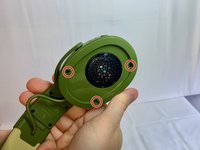
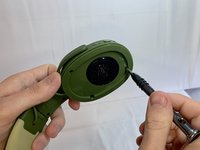
    • Remove three 12 mm Phillips #1 screws located underneath the left ear cushion of the headphones.

    • You have to work on the right-side earphone.

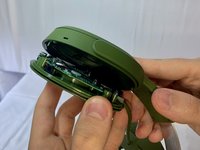
  5. Skullcandy Crusher Wireless Battery Replacement: 5 단계, 이미지 3개 중 1개 Skullcandy Crusher Wireless Battery Replacement: 5 단계, 이미지 3개 중 2개 Skullcandy Crusher Wireless Battery Replacement: 5 단계, 이미지 3개 중 3개
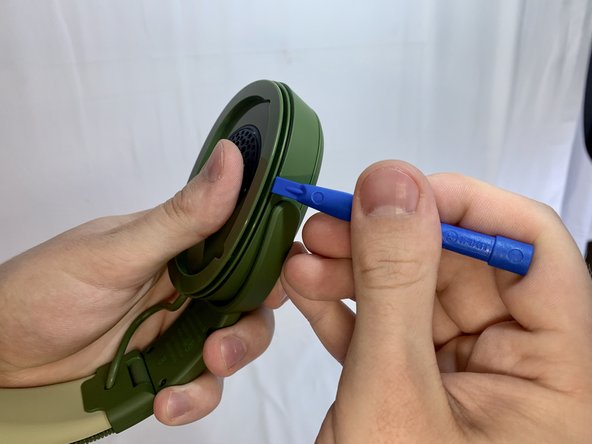
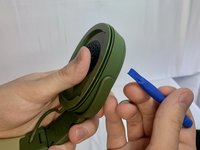
    • Slide a plastic opening tool between the plastic frame and speaker assembly of the headphones.

    • Gently pry the speaker part away from the frame of the headphones.

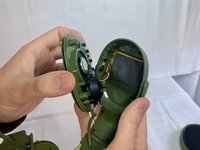
  6. Skullcandy Crusher Wireless Battery Replacement: 6 단계, 이미지 2개 중 1개 Skullcandy Crusher Wireless Battery Replacement: 6 단계, 이미지 2개 중 2개
    • Separate the headphone speaker assembly from the headphone speaker frame.

  7. Skullcandy Crusher Wireless Battery Replacement: 7 단계, 이미지 3개 중 1개 Skullcandy Crusher Wireless Battery Replacement: 7 단계, 이미지 3개 중 2개 Skullcandy Crusher Wireless Battery Replacement: 7 단계, 이미지 3개 중 3개
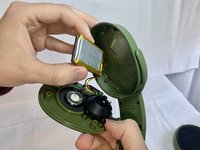
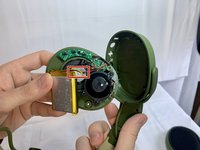
    • Remove the battery from the headphone housing.

    • Use a soldering iron to desolder the black, red, and yellow cables from the board and disconnect the battery.

    • For more information on soldering, please, use this Solder and Desolder Connections guide.

결론

To reassemble your device, follow these instructions in reverse order.

다른 6명이 해당 안내서를 완성하였습니다.

작성자

1다른 기여자 명과 함께

Val

회원 가입일: 03/31/22

1,227 평판

안내서 6개를 작성함

UMass Dartmouth, Team 1-33, Gurgel Spring 2022 UMass Dartmouth, Team 1-33, Gurgel Spring 2022 회원

UMASSD-GURGEL-S22S1G33

1 회원

안내서 13개를 작성함

5가이드 댓글

Hi, Can you specify this replacement batterys name and model number?

kituserkituserkituser kit - 답글 공유

1050mAh, 3,7V 3,885Wh

Mika Björn Wilhelmsen - 공유

Which battery should i buy for my skull candy hes evo??

Lakshit Meena - 답글 공유

donde puedo conseguir la bateria de los skullcandy crusher?
y cual bateria lleva?

pedro landeros - 답글 공유

Am I able to send my headphones to you to be fixed?

If I can, what would the cost be?

I have two headphone sets

Jeffrey Timothy Valerie - 답글 공유

댓글 쓰기

조회 통계:

지난 24시간: 6

지난 7일: 32

지난 30일: 196

전체 시간: 15,118