주요 콘텐츠로 건너뛰기
수리 커뮤니티 가입 - 계정 만들기

iPhone 15 Pro Back Glass Replacement

필요한 것

  1. iPhone 15 Pro Back Glass Replacement, Prepare your iPhone for disassembly: 1 단계, 이미지 2개 중 1개 iPhone 15 Pro Back Glass Replacement, Prepare your iPhone for disassembly: 1 단계, 이미지 2개 중 2개
    • Let your phone's battery drain below 25% before starting this repair—a charged lithium‑ion battery may catch fire if damaged.

    • Unplug all cables from your phone.

    • Hold the power and either volume button and slide to power off your phone.

  2. iPhone 15 Pro Back Glass Replacement, Tape over any cracks: 2 단계, 이미지 2개 중 1개 iPhone 15 Pro Back Glass Replacement, Tape over any cracks: 2 단계, 이미지 2개 중 2개
    • If your screen or back glass is cracked, lay overlapping strips of packing tape over the glass to protect yourself and make disassembly easier.

    • Make sure there's a smooth area near the bottom edge that's big enough for a suction cup to stick to.

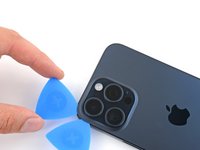
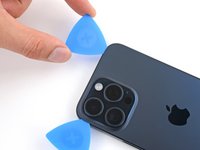
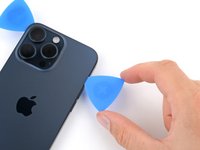
  3. iPhone 15 Pro Back Glass Replacement, Mark your opening picks: 3 단계, 이미지 3개 중 1개 iPhone 15 Pro Back Glass Replacement, Mark your opening picks: 3 단계, 이미지 3개 중 2개 iPhone 15 Pro Back Glass Replacement, Mark your opening picks: 3 단계, 이미지 3개 중 3개
    • If inserted too far, an opening pick can damage your device. Follow this step to mark your pick and prevent damage.

    • Measure 3 mm from the tip and mark the opening pick with a permanent marker.

    • You can also mark the other corners of the pick with different measurements.

    • Alternatively, tape a coin to a pick 3 mm from the tip.

    • Apple sells an Adhesive Cutter tool for cutting the display adhesive safely in their Self Repair Store.

  4. iPhone 15 Pro Back Glass Replacement, Remove the pentalobe screws: 4 단계, 이미지 2개 중 1개 iPhone 15 Pro Back Glass Replacement, Remove the pentalobe screws: 4 단계, 이미지 2개 중 2개
    • Use a P2 pentalobe screwdriver to remove the two 7 mm‑long screws on either side of the charging port.

  5. iPhone 15 Pro Back Glass Replacement, Heat the bottom edge: 5 단계, 이미지 1개 중 1개
    • Use a hair dryer or heat gun to heat the bottom edge of the back glass until it's hot to the touch.

    • Be careful not to heat the phone hotter than this—the battery is susceptible to heat damage.

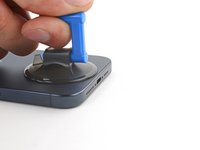
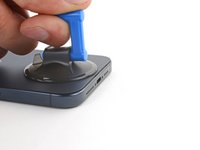
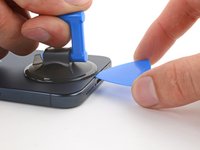
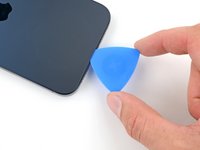
  6. iPhone 15 Pro Back Glass Replacement, Insert an opening pick: 6 단계, 이미지 3개 중 1개 iPhone 15 Pro Back Glass Replacement, Insert an opening pick: 6 단계, 이미지 3개 중 2개 iPhone 15 Pro Back Glass Replacement, Insert an opening pick: 6 단계, 이미지 3개 중 3개
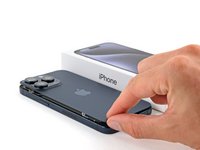
    • Apply a suction handle to the bottom edge of the back glass.

    • Pull up on the handle with a strong, steady force to create a gap between the back glass and the frame.

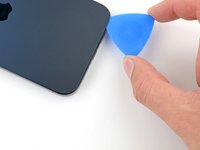
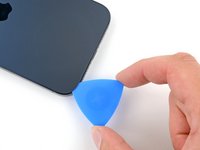
    • Insert the tip of an opening pick into the gap.

  7. iPhone 15 Pro Back Glass Replacement, Back glass information: 7 단계, 이미지 1개 중 1개
    • As you slice the adhesive securing the back glass in the next steps, be careful of the wireless charging cable near the volume buttons.

  8. iPhone 15 Pro Back Glass Replacement, Separate the bottom edge adhesive: 8 단계, 이미지 3개 중 1개 iPhone 15 Pro Back Glass Replacement, Separate the bottom edge adhesive: 8 단계, 이미지 3개 중 2개 iPhone 15 Pro Back Glass Replacement, Separate the bottom edge adhesive: 8 단계, 이미지 3개 중 3개
    • Don't insert your opening pick deeper than 5 mm along the bottom edge.

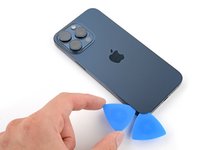
    • Slide your pick back and forth along the bottom edge to separate the adhesive.

    • Leave your pick inserted in the bottom left corner to prevent the adhesive from re-sealing.

  9. iPhone 15 Pro Back Glass Replacement, Heat the left edge: 9 단계, 이미지 1개 중 1개
    • Heat the left edge of the back glass until it's hot to the touch.

  10. iPhone 15 Pro Back Glass Replacement, Separate the left edge adhesive: 10 단계, 이미지 2개 중 1개 iPhone 15 Pro Back Glass Replacement, Separate the left edge adhesive: 10 단계, 이미지 2개 중 2개
    • Don't insert your pick deeper than 5 mm along the left edge.

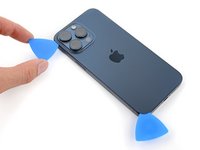
    • Insert a second opening pick to the left of the first one.

    • Slide this pick to the top left corner of the back glass to separate the left edge adhesive.

    • Leave this pick inserted to prevent the adhesive from resealing.

  11. iPhone 15 Pro Back Glass Replacement, Heat the top edge: 11 단계, 이미지 1개 중 1개
    • Heat the top edge of the back glass until it's hot to the touch.

  12. iPhone 15 Pro Back Glass Replacement, Separate the top edge adhesive: 12 단계, 이미지 3개 중 1개 iPhone 15 Pro Back Glass Replacement, Separate the top edge adhesive: 12 단계, 이미지 3개 중 2개 iPhone 15 Pro Back Glass Replacement, Separate the top edge adhesive: 12 단계, 이미지 3개 중 3개
    • Don't insert your pick deeper than 5 mm along the top edge.

    • Insert a third opening pick in the top left corner of the back glass.

    • Slide your pick to the top right corner to separate the top edge adhesive.

    • If the top edge of the back glass doesn't separate, the top clips may be stuck. Use the flat end of a spudger to press the clips inward until they release.

  13. iPhone 15 Pro Back Glass Replacement, Separate the top right corner adhesive: 13 단계, 이미지 3개 중 1개 iPhone 15 Pro Back Glass Replacement, Separate the top right corner adhesive: 13 단계, 이미지 3개 중 2개 iPhone 15 Pro Back Glass Replacement, Separate the top right corner adhesive: 13 단계, 이미지 3개 중 3개
    • Don't slide your pick past the volume up button to avoid slicing the wireless charging cable.

    • Rotate your pick around the top right corner of the back glass.

    • Slide your pick to the volume up button.

    • Leave this pick in place to prevent the adhesive from resealing.

  14. iPhone 15 Pro Back Glass Replacement, Heat the right edge: 14 단계, 이미지 1개 중 1개
    • Heat the right edge of the back glass until it's hot to the touch.

  15. iPhone 15 Pro Back Glass Replacement, Separate the right edge adhesive: 15 단계, 이미지 3개 중 1개 iPhone 15 Pro Back Glass Replacement, Separate the right edge adhesive: 15 단계, 이미지 3개 중 2개 iPhone 15 Pro Back Glass Replacement, Separate the right edge adhesive: 15 단계, 이미지 3개 중 3개
    • Don't slide your pick past the volume down button to avoid slicing the wireless charging cable.

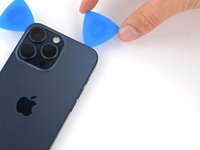
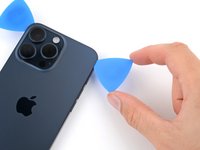
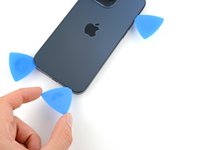
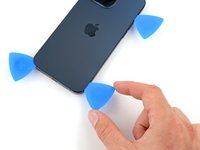
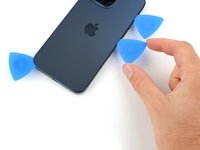
    • Insert a fourth opening pick at the bottom edge of the back glass.

    • Rotate your pick around the bottom right corner of the back glass.

    • Slide your pick to the volume down button.

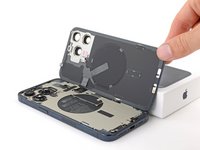
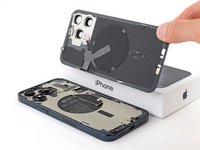
  16. iPhone 15 Pro Back Glass Replacement, Swing open the back glass: 16 단계, 이미지 3개 중 1개 iPhone 15 Pro Back Glass Replacement, Swing open the back glass: 16 단계, 이미지 3개 중 2개 iPhone 15 Pro Back Glass Replacement, Swing open the back glass: 16 단계, 이미지 3개 중 3개
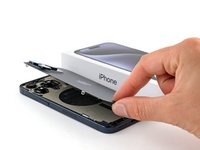
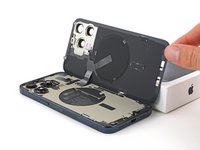
    • Gently swing open the back glass over the right edge of the phone.

    • If the back glass feels stuck, go back around the perimeter to check for missed sections of adhesive or stuck clips.

    • Rest the back glass against a box or similar object so it doesn't strain the cable.

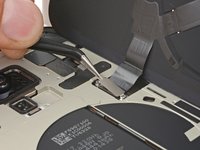
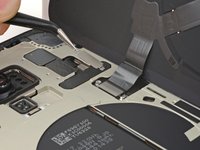
  17. iPhone 15 Pro Back Glass Replacement, Remove the wireless charging connector cover: 17 단계, 이미지 3개 중 1개 iPhone 15 Pro Back Glass Replacement, Remove the wireless charging connector cover: 17 단계, 이미지 3개 중 2개 iPhone 15 Pro Back Glass Replacement, Remove the wireless charging connector cover: 17 단계, 이미지 3개 중 3개
    이 단계에 사용된 도구:
    Tweezers
    $4.99
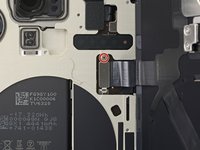
    • Use a tri-point Y000 driver to remove the 1.0 mm screw securing the wireless charging connector cover.

    • Use tweezers to slide the cover out of its slot on the logic board and remove it.

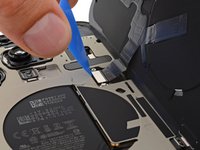
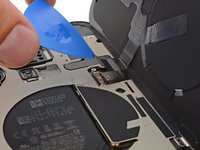
  18. iPhone 15 Pro Back Glass Replacement, Disconnect the wireless charging coil: 18 단계, 이미지 2개 중 1개 iPhone 15 Pro Back Glass Replacement, Disconnect the wireless charging coil: 18 단계, 이미지 2개 중 2개
    • Use the tip of an opening pick to pry up and disconnect the wireless charging coil press connector.

    • To reconnect a press connector, align it over its socket and gently press down on one side until it clicks into place, then press down on the other side.

  19. iPhone 15 Pro Back Glass Replacement, Remove the back glass: 19 단계, 이미지 2개 중 1개 iPhone 15 Pro Back Glass Replacement, Remove the back glass: 19 단계, 이미지 2개 중 2개
    • Remove the back glass.

    • During reassembly, use this guide to reapply adhesive and install your back glass.

결론

To reassemble your iPhone, follow this guide to apply adhesive and install your back glass.

After your repair, depending on the replacement part, you may be able to calibrate it using Apple's Repair Assistant, available as of iOS 18. Update your device, navigate to Settings General About Parts & Service History, tap Restart & Finish Repair, and follow the onscreen prompts.

Take your e-waste to an R2 or e-Stewards certified recycler.

Repair didn’t go as planned? Try some basic troubleshooting, or ask our Answers community for help.

다른 24명이 해당 안내서를 완성하였습니다.

작성자

5다른 기여자 명과 함께

Spencer Day

회원 가입일: 09/14/22

160,030 평판

안내서 1,045개를 작성함

iFixit iFixit 회원

Staff

123 회원들

안내서 23,992개를 작성함

11가이드 댓글

Dont understand why Apple used all-glueed back glass earlier.

Oleksandr Ivanov - 답글

Is the flash camera still tied to the motherboard?

Duck - 답글

The flash unit is glued to the back glass, along with the wireless charging coil. The rear cameras are accessible by entering through the screen.

Clay Eickemeyer -

Wo bekomme ich denn eine solche Rückseite her?

Kim Riedel - 답글

does ifixit sell parts for this?

Meow Purr - 답글

댓글 쓰기

조회 통계:

지난 24시간: 163

지난 7일: 1,109

지난 30일: 5,115

전체 시간: 92,833