주요 콘텐츠로 건너뛰기
수리 커뮤니티 가입 - 계정 만들기

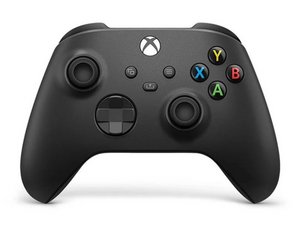
클래식 Xbox 무선 컨트롤러의 세 번째 개정판은 2020년 11월에 출시되었으며, Xbox Series X 및 Series S와 함께 제공되었습니다. 이 컨트롤러는 이전 Xbox One 게임기와 PC에서 하위 호환됩니다.

Potentiometer of joystick replacement problem

Hello,

I replaced the one potentiometer of joystick from a Xbox Series X controller but when trying it I was not able to calibrate it. Changed again and same thing. Does the potentiometer has to have an initial resistance value so I am able to calibrated? Maybe the resistance is very high/low to be able to

답변되었습니다! 답변 보기 저도 같은 문제가 있습니다

좋은 질문입니까?

점수 0
댓글 3개

Did you just change the potentiometer only or the whole joystick assembly? Did you try to cslibrate on a PC or an Xbox?

I changed only the potentiometer 2 times with no success. The the whole joystick worked. I calibrated it on a emulator in PC because I don't have an actual working Xbox Series X

Okay, glad that replacing the joystick worked. Should be OK now! Calibrating on the PC should do it! Have a nice day :)!

댓글 달기

답변 1개

선택된 해법

Hi!

Whenever the potentiometer won't fix it, it's advised to replace the joystick assembly completely.

You can follow this guide for that: Xbox Series X/S 무선 컨트롤러 조이스틱 교체

After this is done, you can try to calibrate them again.

Please let us know how it goes!

이 답변이 도움이 되었나요?

점수 2

댓글 4개:

Hi,

Thank you very much. I discovered that I was using the same potentiometers I use for PS5 controller and the resistance value is different (PS5 2k3 ohm and Xbox 10k ohm) so that was the issue why I could not calibrate it

Ah that explains it!! It’s correct that they are different. Glad that you found out :)! Have a great day!

I replaced all my ps4 controller sticks with hall sensor ones. Never had a problem since.

Yes that works :)! But this is regarding a Xbox controller. I heard that sometimes it can interfere here with the magnets.

댓글 달기

답변을 추가하세요

sascha bauló martínez 영원히 감사할 것입니다.
조회 통계:

지난 24시간: 0

지난 7일: 11

지난 30일: 69

전체 시간: 69