
학생-기여 위키
자사 교육 프로그램의 멋진 학생들이 이 위키를 만들었습니다.
일반적인 PS4 컨트롤러 문제
다음 단계별 DIY 문제해결 안내서를 통해 PS4 컨트롤러에서 발생하는 가장 일반적인 문제를 진단하고 해결하세요.
| 2가지 해결책 | DualShock 4 버튼 끼임 |
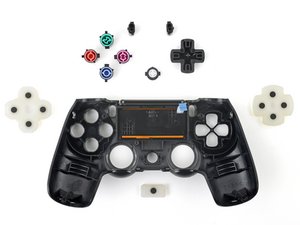 | 컨트롤러 버튼이 눌린 상태에서 빠지지 않습니다. 잠재적인 원인으로는 버튼 틈새의 먼지나 이물질, 또는 버튼 결함이 있습니다. 전체 보기 원인 및 해결 방법. |
| 6가지 해결책 | DualShock 4 진동 미작동 |
 | 컨트롤러가 진동하지 않습니다. 잠재적인 원인으로는 배터리 결함, 진동 모터 결함, 진동 기능 꺼짐, 일반적인 컨트롤러 오작동, 또는 PS4와 컨트롤러 간의 불안정한 무선 연결이 있습니다. 전체 보기 원인 및 해결 방법. |
| 3가지 해결책 | DualShock 4 전원 켜지지 않음 |
 | 컨트롤러의 전원이 켜지지 않습니다. 잠재적인 원인으로는 방전된 배터리, 충전기 결함, 배터리 결함, 또는 일반적인 컨트롤러 오작동이 있습니다. 전체 보기 원인 및 해결 방법. |
| 3가지 해결책 | DualShock 4 터치 패드 미작동 |
 | 터치 패드가 반응하지 않습니다. 잠재적인 원인으로는 터치 패드 결함, 호환되지 않는 게임, 소프트웨어 업데이트 필요, 또는 일반적인 펌웨어 오류가 있습니다. 전체 보기 원인 및 해결 방법. |
| 2가지 해결책 | DualShock 4 아날로그 스틱 고정됨 |
 | 아날로그 스틱을 눌렀을 때 끼어서 다시 올라오지 않습니다. 잠재적인 원인으로는 아날로그 스틱 틈새의 먼지나 이물질, 또는 고장 나거나 휘어진 아날로그 스틱이 있습니다. 전체 보기 원인 및 해결 방법. |
| 4가지 해결책 | DualShock 4 배터리가 충전되지 않음 |
 | 컨트롤러가 충전되지 않고 앞면의 표시등도 켜지지 않습니다. 잠재적인 원인으로는 일반적인 펌웨어 오작동, 배터리 결함, 충전 케이블 불량, 또는 컨트롤러 충전 포트 결함이 있습니다. 전체 보기 원인 및 해결 방법. |
| 2가지 해결책 | DualShock 4 게임기 연결 불가 |
 | 컨트롤러가 켜져 있고 정상 작동하지만 게임기에 연결되지 않습니다. 잠재적인 원인으로는 일반적인 펌웨어 오작동 또는 무선 연결을 제한하는 Wi-Fi 공유기가 있습니다. 전체 보기 원인 및 해결 방법. |
| 2가지 해결책 | DualShock 4 소리 나지 않음 |
 | 컨트롤러의 스피커 시스템에서 오디오가 나오지 않습니다. 잠재적인 원인으로는 컨트롤러의 음량이 올라가 있지 않거나 일반적인 펌웨어 오류가 있습니다. 전체 보기 원인 및 해결 방법. |
문제를 찾을 수 없나요?
겪고 계신 구체적인 문제에 대한 추가적인 도움을 받으려면 답변 포럼을 확인해 보세요. 누군가 이미 동일한 문제를 해결했을 수도 있습니다.

팀

Cal Poly, Team 6-21, Maness Winter 2014 Cal Poly, Team 6-21, Maness Winter 2014 회원
CPSU-MANESS-W14S6G21
4 회원들
안내서 84개를 작성함

댓글 159개
My command buttons on my DualShock4 do not respond, even after a manual reset. The controller can still turn on the PS4 though. Do I just need to replace the controller entirely, as I do not want to waste time to try and fix it myself.
mantronik - 답글 공유
I learned that if your buttons are sticky, brush them with a slightly wet toothbrush. Let it sit for a couple of seconds then dry them.
John - 답글 공유
A In Depth Guide to fixing DS4 Connection Issues.
1. Put your DS4 in pairing mode by holding PS button and share simultaneously. The light bar should begin to flash white.
2. Connect the DS4 to the device via Bluetooth on any of the following devices. ( PC, Android, PS3 )
3. Disconnect the DS4 from the paired Bluetooth device. Make sure you disconnect directly from the bluetooth device. Once disconnected locate a pin or a small narrow object and push into the reset hole on the rear of the DS4. Hold in place for 10 seconds.
4. Connect the USB cable to the DS4 and proceed to power on the PS4. Once the system has loaded to the login screen it will ask you to press the PlayStation Button. This will iniate pairing between the DS4 and PS4. The DS4 should now be fully operable.
Make sure to follow steps exactly for best results.
4wrd4evr - 답글 공유
My ps4 controller makes à strange doubleclicking sound when i'm touching
The touchpad iT sounds like THE touchpad is à littlebit loose do you know how you change that
Ps sorry for THE bad english
Benjamin - 답글 공유
when i open my ps4 the controller starts to flash (like it tries to connect with the ps4) but the it turns orange and does not connect eventually.
Elisavet Parra - 답글 공유