HDD
이 번역은 기계에 의해 생성되었으며, 아직 사람이 검토하지 않았습니다. 이 언어를 구사하시나요? 검토하기.
|
답변 1개 0 점 |
How do I replace the Keyboard |
|
답변 1개 0 점 |
No power, not charging |
|
답변 1개 0 점 |
How do I replace the Touchpad |
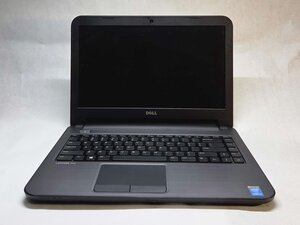
Dell Latitude 3440 노트북(Exx40)은 Dell Latitude 시리즈의 일부입니다. 이 모델은 2013년에 출시되어 Vostro 시리즈의 뒤를 잇는 보급형 비즈니스 노트북이 되었습니다. 4세대 Intel 프로세서를 사용했으며 기본 사양 기준 약 600~700달러에 판매되었습니다.
Latitude 3440 노트북은 14인치 디스플레이와 1366x768 해상도를 갖추고 있으며, 무광 스크린 덕분에 밝은 환경에서 사용하기 적합합니다. 노트북 두께는 25mm, 무게는 2.1kg이며 플라스틱 재질의 섀시로 제작되었습니다. USB 포트, VGA 포트, 이더넷 포트를 통해 외부 장치에 연결할 수 있지만, HDMI 포트는 포함되어 있지 않습니다. 또한 무선 연결 옵션을 제공하며 DVD 드라이브가 장착되어 있습니다.
Dell Latitude 3440 노트북은 2GB에서 8GB까지의 메모리 구성과 i3, i5, i7 CPU 옵션으로 제공되었습니다. 대규모 리콜이나 광범위한 제조 결함은 보고되지 않았습니다. Latitude 3440은 배터리 사용 시간, 키보드 기능, 터치 패드 응답성으로 자주 호평을 받았습니다. Dell은 결국 이 버전의 Latitude 생산을 중단했으며, 2023년에 13세대 CPU를 탑재한 새로운 디자인의 Latitude 3440을 출시했습니다.
Dell Latitude 3440은 2013년에 처음 출시된 14인치 노트북입니다. 이 모델은 하단 커버의 모델 라벨을 통해 식별할 수 있으며, 여기에는 “Latitude 3440”과 함께 서비스 태그 및 익스프레스 서비스 코드 스티커가 표시되어 있습니다.
2013년형 Latitude 3440은 같은 이름을 가진 2023년형 최신 모델과 다릅니다. 구형 버전은 더 두꺼운 섀시, 광학 드라이브를 갖추고 있으며 4세대 Intel 프로세서를 사용합니다. 사용자는 호환성을 보장하기 위해 안내서를 사용하기 전에 이러한 기능을 확인해야 합니다.
이 모델은 내장형 DVD-RW 광학 드라이브, 착탈식 배터리, Windows 8 제품 키 스티커를 포함하여 2013년 버전만의 고유한 물리적 특징으로 구분됩니다. 노트북 왼쪽에는 2개의 USB 포트가 있으며 HDMI 포트, 이더넷 포트, SD 카드 슬롯이 있고 후면 가장자리에 있는 두 개의 슬라이딩 래치를 사용하여 배터리를 분리할 수 있습니다.
CPU: 4세대 i3, i5 또는 i7
GPU:
통합형: Intel HD 4400 그래픽
외장형: NVIDIA GeForce GT740M (2GB DDR3)
메모리: 2GB, 4GB, 6GB 및 8GB (DDR3)
저장 장치: 5400 rpm 500GB 하드 드라이브
스크린:
크기: 14인치
해상도: 1366 x 768 픽셀
밝기: 200니트
주사율: 60Hz
배터리: 40Whr
포트:
''오디오: 1*** 3.5mm 콤보 헤드폰 및 마이크 잭
''비디오: 1*** 19핀 VGA 포트
''네트워크:*** 1 RJ45 포트
''USB: 2 USB 3.0, 1*** USB 2.0
''미디어 카드: 1*** 4-in-1 슬롯
오디오: 2 x 2W 스피커
카메라:
해상도: 1280 x 720 픽셀
프레임 속도: 30fps
시야각: 66도
통신:
LAN: 마더보드 온보드(LOM) 10/100/1000Mbps 이더넷 LAN
Wi-Fi: Wi-Fi 802.11 b/g/n
다음 리소스는 2013 Dell Latitude 3440에 대한 자세한 사양, 도표 및 지원 정보를 제공합니다.
Dell Latitude 3440/3540 Asennus- ja ominaisuustiedot
Dell Latitude 3440/3540 Informasjon om oppsett og funksjoner
Dell Latitude 3440 Panduan Pemilik Komputer
Dell Latitude 3440 دلیل المالك
Dell Latitude 3440/3540 Oplysninger om installation og funktioner
Dell Latitude 3440/3540 — Informace o instalaci a funkcích
Dell Latitude 3440/3540 Informaţii despre configurare şi funcţii
Dell Latitude 3440 Manual del propietario
Dell Latitude 3440 Gebruiksaanwijzing
Dell Latitude 3440 Uporabniški priročnik
Dell Latitude 3440/3540 Informazioni sulla configurazione e sulle funzionalità
Dell Latitude 3440 Príručka majiteľa
Dell Latitude 3440 Manual do proprietário
Dell Latitude 3440 Benutzerhandbuch
Dell Latitude 3440/3540 Information om installation och funktioner
Dell Latitude 3440/3540 Informationen zu Setup und Funktionen
Dell Latitude 3440 Omistajan opas
Dell Latitude 3440 Kullanıcı El Kitabı
Dell Latitude 3440 Korisnički priručnik
Dell Latitude 3440/3540 Az üzembe helyezésre és a funkciókra vonatkozó információk
Dell Latitude 3440 Podręcznik użytkownika
Dell Latitude 3440 Manualul proprietarului
Dell Latitude 3440 Руководство по эксплуатации
Dell Latitude 3440 Kezelési kézikönyv
Dell Latitude 3440 Εγχειρίδιο κατόχου
Dell Latitude 3440 Brugervejledning
Dell Latitude 3440 Manual do proprietário
Dell Latitude 3000 Series 14-inch 3440 and 15-inch 3540 Technical Guidebook
Dell Latitude 3440 Owner's Manual
Dell Latitude 3440 Owner's Manual
Dell Latitude 3440 Ägarens handbok
Dell Latitude 3440 Manuel du propriétaire
Dell Latitude 3440/3540 Informatie over installatie en functies
Dell Latitude 3440 Brukerhåndbok
Dell Latitude 3440 Manuale del proprietario
지난 24시간: 2
지난 7일: 15
지난 30일: 95
전체 시간: 1,747